Private Repository
How to create your private repository in RS School?
At the beginning of the course, you need to:
- open
Dashboardin RS App - click "Create repository" (or "Fix repository" if repository settings need to be reset to initial state)
- GitHub automatically sends you an invite to access the repository. The invite comes to the email you specified when registering on GitHub (not the email you specified in RS App)
How to work with a private repository?
- Clone it to your computer:
git clone https://github.com/rolling-scopes-school/<your-school-repository>.git - Go to the cloned repository folder:
cd <your-school-repository> - Set your data in the config (enter the email linked to your GitHub account):
git config user.name "Name Surname"git config user.email "your@email" - Create a branch from
mainwith the assignment name:git checkout -b <task-name> - Create a folder with the assignment name:
mkdir <task-name>All files related to the assignment should be in it. - Complete the assignment, committing solutions in the process (see commit requirements).
- Push the branch to the remote branch on GitHub:
git push origin <task-name> - Create a Pull Request from branch
<task-name>to branchmain. You don't need to merge the Pull Request.
How to deploy an assignment from the school's private repository?
- In the
gh-pagesbranch, you need to place a folder with the assignment name, and the project files in it. Theindex.htmlfile should be at the top level. This can be done in two ways:- for projects that don't use
webpack, it's enough to make a Pull Request from the development branch to thegh-pagesbranch and merge it. - for projects that use
webpack, you need to create a project build by running thenpm run buildcommand, create a folder with the assignment name in thegh-pagesbranch, and place the built project files in the created folder. Note that the.gitignorefile lists the names of folders created during application build. Therefore, in thegh-pagesbranch, the.gitignorefile can be deleted.
- for projects that don't use
- The link to the deployed application version looks like:
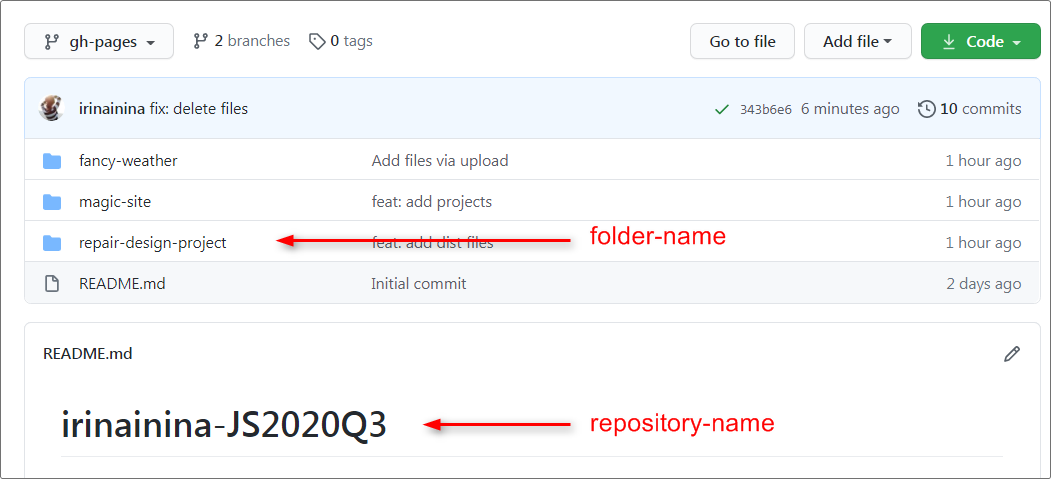
https://rolling-scopes-school.github.io/repository-name/folder-name, whererepository-name- your repository name in rs schoolfolder-name- the folder name with project files
- All other projects are deployed this way, a separate folder is created for each of them
- this is how the
gh-pagesbranch looks with project folders - example link:
https://rolling-scopes-school.github.io/irinainina-JS2020Q3/repair-design-project/
- this is how the
Video Deploy to GitHub Pages
FAQ
I deleted the gh-pages branch, what should I do?
- Create the
gh-pagesbranch frommainagain and push it to your school private repository - In
DashboardRS App, click theFix repositorybutton - Make any commit to the
gh-pagesbranch and push the changes. (Each push togh-pagestriggers the deployment mechanism for this branch) - Wait 5 minutes
I can't open/merge a Pull Request from the development branch to the gh-pages branch, what should I do?
- Delete the
gh-pagesbranch on GitHub - In
DashboardRS App, click theFix repositorybutton - Merge the Pull Request into the
gh-pagesbranch
My site is not deploying and the Deployments section is not appearing, what should I do?
- Go to the settings of the private repository and check/set the required branch for deployment:
gh-pages/root - If there's no settings section, in
DashboardRS App, click theFix repositorybutton, settings should appear.

Adding a list of completed assignments and contacts to the private repository
The created private repository already has a readme.md file with the repository name.
You can add your contacts (or a link to CV with contacts) to this file and maintain a list of completed assignments in it. This will help reviewers find your work in case of an error during submission.
After creating the gh-pages branch from main, this file will be copied there and will be available at
https://rolling-scopes-school.github.io/<repository-name>/